数组变化检测
在 Vue3 中,Vue 会对数组的变化进行检测,但是并不是所有的变化都能被检测到。
数组的变化检测主要是通过重写数组的原型方法来实现的,所以只有通过这些方法改变数组才能被检测到。
变更方法
Vue 能侦听响应式数组的变化,并在被调用时触发视图更新。
push()
pop()
shift()
unshift()
splice()
sort()
reverse()
e.g.
1
2
3
4
5
6
7
8
9
10
11
12
13
14
15
16
17
18
19
20
21
22
23
24
25
26
27
28
29
30
31
32
33
34
35
36
37
38
39
40
41
42
43
44
45
46
47
48
49
50
51
52
53
54
55
56
57
58
59
| <template>
<div>
<button @click="add">add</button>
<button @click="remove">remove</button>
<button @click="reverse">reverse</button>
<button @click="sort">sort</button>
<button @click="splice">splice</button>
<button @click="push">push</button>
<button @click="pop">pop</button>
<button @click="shift">shift</button>
<button @click="unshift">unshift</button>
<div v-for="item in items" :key="item.id">
{{ item.name }}
</div>
</div>
</template>
<script>
export default {
data() {
return {
items: [
{ id: 1, name: "a" },
{ id: 2, name: "b" },
{ id: 3, name: "c" },
],
};
},
methods: {
add() {
this.items.push({ id: 4, name: "d" });
},
remove() {
this.items.splice(0, 1);
},
reverse() {
this.items.reverse();
},
sort() {
this.items.sort((a, b) => a.id - b.id);
},
splice() {
this.items.splice(0, 1, { id: 4, name: "d" });
},
push() {
this.items.push({ id: 4, name: "d" });
},
pop() {
this.items.pop();
},
shift() {
this.items.shift();
},
unshift() {
this.items.unshift({ id: 4, name: "d" });
},
},
};
</script>
|
替换方法
替换方法会用新数组替换原数组,vue 会对新数组进行响应式处理。
Vue 不能侦听以下变动的数组:
e.g.
1
2
3
4
5
6
7
8
9
10
11
12
13
14
15
16
17
18
19
20
21
22
23
24
25
26
27
28
29
30
31
| <template>
<div>
<button @click="replace">replace</button>
<button @click="length">length</button>
<div v-for="item in items" :key="item.id">
{{ item.name }}
</div>
</div>
</template>
<script>
export default {
data() {
return {
items: [
{ id: 1, name: "a" },
{ id: 2, name: "b" },
{ id: 3, name: "c" },
],
};
},
methods: {
replace() {
this.items[0] = { id: 4, name: "d" };
},
length() {
this.items.length = 2;
},
},
};
</script>
|
解决方法
Vue.set()
Array.prototype.splice()
e.g.
1
2
3
4
5
6
7
8
9
10
11
12
13
14
15
16
17
18
19
20
21
22
23
24
25
26
27
28
29
30
31
32
33
| <template>
<div>
<button @click="replace">replace</button>
<button @click="length">length</button>
<div v-for="item in items" :key="item.id">
{{ item.name }}
</div>
</div>
</template>
<script>
export default {
data() {
return {
items: [
{ id: 1, name: "a" },
{ id: 2, name: "b" },
{ id: 3, name: "c" },
],
};
},
methods: {
replace() {
this.$set(this.items, 0, { id: 4, name: "d" });
},
length() {
this.items.splice(2);
},
},
};
</script>
|
计算属性
模板中放入太多的逻辑会让模板过重且难以维护,因此对于任何复杂逻辑,你都应当使用计算属性。
计算属性是基于它们的依赖进行缓存的,只有在相关依赖发生改变时,才会重新求值。
例如,下面的例子将演示一个模板中的逻辑:
1
2
3
4
5
6
7
8
9
10
11
12
13
14
15
16
17
| <template>
<h3>{{ items.name }}</h3>
<p>{{ items.content.length > 0 ? 'Yes': 'No' }}</p>
</template>
<script>
export default {
data() {
return {
items:{
name:"Yuzhii",
content:["Python","Vue","React"]
}
};
}
};
</script>
|
虽然这个例子很简单,但是模板中的逻辑会变得越来越复杂,这时候就需要使用计算属性。
1
2
3
4
5
6
7
8
9
10
11
12
13
14
15
16
17
18
19
20
21
22
23
24
25
| <template>
<h3>{{ name }}</h3>
<p>{{ content }}</p>
</template>
<script>
export default {
data() {
return {
items:{
name:"Yuzhii",
content:["Python","Vue","React"]
}
};
},
computed:{
name(){
return this.items.name
},
content(){
return this.items.content.length > 0 ? 'Yes': 'No'
}
}
};
</script>
|
可以看见,将模板中的逻辑放到了计算属性中,这样模板就变得简洁了。
虽然 methods 也可以实现同样的效果,但是计算属性值会给予其响应式依赖被缓存,只有在相关依赖发生改变时,才会重新求值,而 methods 每次都会重新计算。
Class 与 Style 绑定
在 Vue3 中,可以使用 v-bind 指令绑定 class 和 style。
Class 绑定
数据绑定的一个常见需求场景是操作元素的 class 列表和它的内联样式。因为它们都是属性,所以我们可以用 v-bind 处理它们:只需要计算出表达式最终的字符串。
1
2
3
4
5
6
7
8
9
10
11
12
13
14
15
16
17
18
19
20
21
22
23
24
25
26
27
28
29
30
31
32
33
34
35
36
| <template>
<div>
<div :class="classObject">classObject</div>
<div :class="classArray">classArray</div>
<div :class="classObject2">classObject2</div>
<div :class="classArray2">classArray2</div>
</div>
</template>
<script>
export default {
data() {
return {
isActive: true,
error: null,
classObject: {
active: true,
"text-danger": false,
},
classArray: ["active", "text-danger"],
classObject2: {
active: this.isActive,
"text-danger": this.error && this.error.type === "fatal",
},
classArray2: [
{
active: this.isActive,
},
{
"text-danger": this.error && this.error.type === "fatal",
},
],
};
},
};
</script>
|
上面这个例子中,classObject 和 classArray 的结果都是 active text-danger,但是 classObject2 和 classArray2 的结果是 active。
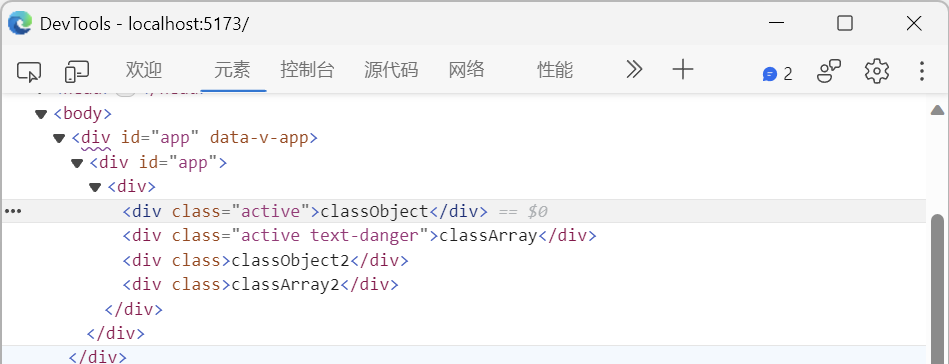
可以增加一个 CSS 样式来验证一下:
1
2
3
4
| .active {
color: red;
font-size: 30px;
}
|
也可以用三元表达式来实现
1
2
3
4
5
6
7
8
9
10
11
12
13
14
15
16
17
| <template>
<div>
<div :class="isActive ? 'active' : ''">isActive</div>
<div :class="error ? 'text-danger' : ''">error</div>
</div>
</template>
<script>
export default {
data() {
return {
isActive: true,
error: null,
};
},
};
</script>
|
提醒
数组与对象嵌套,只能是数组中的对象,不能是对象中的数组
Style 绑定
v-bind:style 的对象语法十分直观——看着非常像 CSS,其实它是一个 JavaScript 对象。 CSS 属性名可以用驼峰式(camelCase)或短横分隔命名(kebab-case):
1
2
3
4
5
6
7
8
9
10
11
12
13
14
15
16
17
18
19
20
21
22
23
| <template>
<div>
<div :style="styleObject">styleObject</div>
<div :style="styleObject2">styleObject2</div>
</div>
</template>
<script>
export default {
data() {
return {
styleObject: {
color: "red",
fontSize: "30px",
},
styleObject2: {
color: "red",
"font-size": "50px",
},
};
},
};
</script>
|
此外,还可以绑定数组语法来动态切换多个样式,但是数组语法只能用在元素的 style 属性上:
1
2
3
4
5
6
7
8
9
10
11
12
13
14
15
16
17
18
19
20
21
22
| <template>
<div>
<div :style="[styleObject, styleObject2]">styleObject</div>
</div>
</template>
<script>
export default {
data() {
return {
styleObject: {
color: "red",
fontSize: "30px",
},
styleObject2: {
color: "red",
"font-size": "50px",
},
};
},
};
</script>
|
但是通常情况下,应用场景比较少。且一般情况下,我们会使用计算属性来处理。